eBay Store Banner Size
Crop an image to eBay's store billboard, logo or marketing banner size and download it.
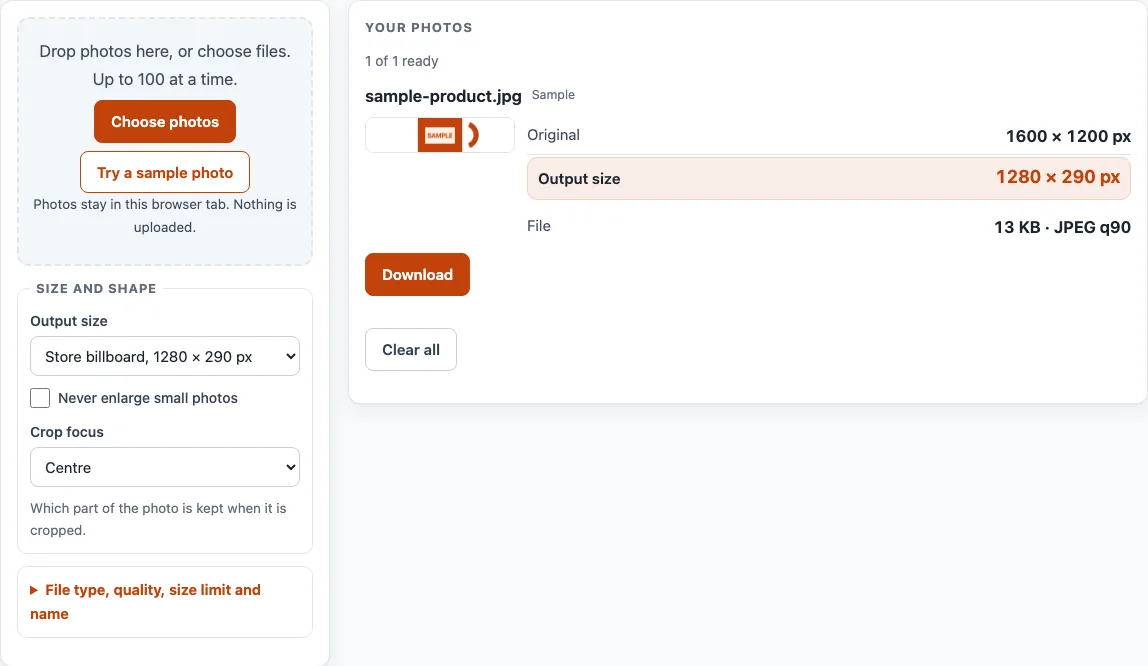
How to use the eBay Store Banner Size Tool
- Open the “Output size” menu and choose Store billboard, 1280 × 290 px for a header banner. The other menu options are Store logo, 300 × 300 px; Marketing banner, 640 × 640 px; and Featured category image, 300 × 300 px. For any other size, choose “Custom size…” and enter Width (px) and Height (px).
- Click “Choose photos” or drop files onto the box. You can add up to 100 photos per batch. To try the tool first, click “Try a sample photo”.
- Under “How the photo fits the frame”, choose “Keep the whole photo (add background around it)” or “Fill the frame (cut off the overflow)”.
- If you chose the fill option, pick a “Crop focus” of Centre, Top, Bottom, Left or Right to decide which part of the photo is kept.
- Turn on “Never enlarge small photos” if you do not want small photos stretched to the output size.
- Pick a file type. JPEG is the default; PNG and WebP are also offered.
- Optionally, set “Keep each file under” in KB or MB.
- Check each card’s “Original”, “Output size” and “File” sizes, plus any notes.
- Click “Download” on a card. When two or more photos are ready, click “Download ZIP (first 10)”.
The tool recalculates every photo when an option changes. “Clear all” empties the list.
What is the eBay store banner size?
The store billboard, which is the header banner, is 1280 × 290 px on eBay’s Managing your eBay Store page. The file must be under 12 MB.
The other store graphics on that page are the store logo at 300 × 300 px, the marketing banner at 640 × 640 px and the featured category image at 300 × 300 px. The billboard, logo and marketing banner each have a 12 MB limit. The page gives no file limit for the featured category image, so this tool does not state one either.
What is the eBay logo size for a store?
The store logo is 300 × 300 px, according to eBay’s page, which was read on 16 October 2026. The logo is square and must be under 12 MB. These are store graphics, not listing photos, so the listing-photo checks do not apply to them.
How does the tool fit a photo into a banner frame?
The default fit is “Fill the frame (cut off the overflow)”. The tool scales the photo so it covers the whole frame, then cuts off the parts that stick out. “Keep the whole photo (add background around it)” does the reverse: the whole photo stays visible and empty space is added around it.
For example, a 4,000 × 3,000 px photo placed in a 1280 × 290 px frame with fill and centre focus keeps a 4,000 × 906 px area starting at x 0, y 1,047. That area is then scaled to 1280 × 290 px. The same photo in a 300 × 300 px frame keeps a 3,000 × 3,000 px area starting at x 500, y 0, scaled to 300 × 300 px.
Transparent areas are filled with the background colour you choose, so the output never has transparency. The tool does not remove or replace backgrounds.
Does enlarging a small photo make it sharper?
No. An enlarged photo has no extra detail, so the card shows the percentage it was enlarged by. “Never enlarge small photos” stops this from happening.
Does resizing remove camera data from a photo?
Yes. Saving through the tool writes a new file without the original’s camera, date and location (EXIF) data. Photos with an EXIF rotation are drawn the right way up.
eBay: what the help pages say
| Item | What it says | Source |
|---|---|---|
| Billboard (header banner) | 1280 × 290 px, under 12 MB | eBay Help: Managing your eBay Store |
| Store logo | 300 × 300 px, under 12 MB | eBay Help: Managing your eBay Store |
| Clickable marketing banner | 640 × 640 px, under 12 MB | eBay Help: Managing your eBay Store |
| Featured category image | A square image, best at 300 × 300 px | eBay Help: Managing your eBay Store |
Read on 16 October 2026. Platforms change their rules; the platform's own page decides.
Worked examples
| Input | Result |
|---|---|
| 4,000 × 3,000 photo, 1,280 × 290 frame, fill the frame (center) | keeps a 4,000 × 906 px area starting at x 0, y 1,047; scaled to 1,280 × 290 px |
| 4,000 × 3,000 photo, 300 × 300 frame, fill the frame (center) | keeps a 3,000 × 3,000 px area starting at x 500, y 0; scaled to 300 × 300 px |
| 3,000 × 2,000 photo, 640 × 640 frame, fill the frame (center) | keeps a 2,000 × 2,000 px area starting at x 500, y 0; scaled to 640 × 640 px |
Calculated by the same code the tool above runs.
Frequently asked questions
What is the ebay store banner size?
The store billboard, or header banner, is 1280 × 290 px on eBay’s Managing your eBay Store page. That page was read on 16 October 2026.
Is the store billboard the same as the store logo?
No. The billboard is 1280 × 290 px, and the store logo is 300 × 300 px. Choose the size that matches the graphic you are making.
Why won’t my HEIC photo open?
HEIC photos from an iPhone may not open outside Safari. If yours does not, export it as JPEG first.
Can the tool remove the background from a photo?
No. It fills transparent areas with the background colour you choose, but it does not remove or replace backgrounds.
Are my photos uploaded anywhere?
No. Photos are read and processed inside your browser and are never uploaded.
Can I download more than 10 results at once?
The free “Download ZIP (first 10)” button holds the first 10 results. Whole-batch ZIPs are a planned Pro feature, and nothing paid exists yet.
What size is the eBay store logo?
300 × 300 px and under 12 MB, according to eBay’s Managing your eBay Store page, read on 16 October 2026.
What size is the marketing banner?
640 × 640 px and under 12 MB, on the same page. The featured category image is a square, best at 300 × 300 px.
Related tools
- eBay Picture Size: Resize photos to eBay’s recommended size and check them against eBay’s numbers.
- Add Lot Number to Photos: Print an increasing lot number or SKU on every photo in a batch.
- Batch Resize Photos for Listings: Resize a whole batch to a marketplace’s size, or to a custom size.
- Batch Watermark Photos: Add a text or logo watermark to many photos at once.
- Image to Square: Turn photos into 1:1 squares by padding or cropping.
- Listing Photo Checker: Test photos against the published Etsy, eBay, Amazon and Shopify numbers.
- Make Photo White Background: Flatten transparent images onto white, pad to a square and whiten a greyish backdrop.
- Amazon Product Image Requirements: Resize product photos for Amazon and fit the product to 85% of a white square.
- Marketplace Photo Size Guides: Browse the photo size page for every marketplace.