Listing Photo Checker
Drop photos to see, per platform, which ones break a published size, file-size or file-type number.
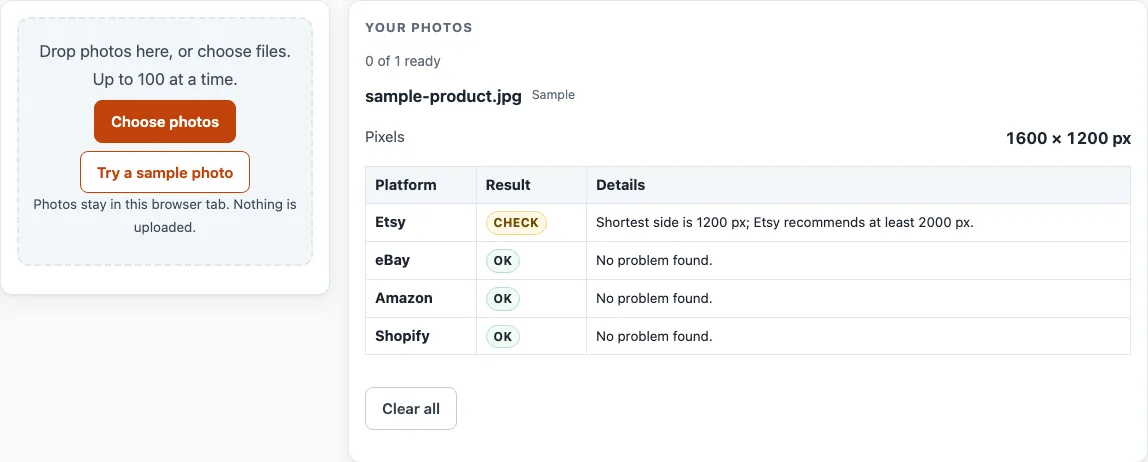
How to use the listing photo checker
- Drop your photos onto the tool at the top of this page. You can drop more than one at a time.
- Wait for a card to appear for each photo.
- Read the “Pixels” and “File” values on each card. These show the size of the image and the size of the file.
- Find the table on the card. It has one row per platform: Etsy, eBay, Amazon and Shopify.
- Look at the “Result” column in each row. It shows OK, Check or Problem.
- Read the “Details” column to see the reason for each result.
- Compare the values with the numbers in the explanation below this guide. For Etsy, files over 1 MB may not finish uploading.
- If a row shows Check or Problem, fix the photo in your own editing software, then drop the new file in again.
- Repeat until the platforms you sell on show OK, or until you have reviewed each Details note.
To see a result before you use your own photos, click “Try a sample photo”. “Clear all” empties the list. The tool has no settings to change. It only measures the photos you drop in, and nothing is changed, downloaded or uploaded.
What does a listing photo checker measure?
A listing photo checker measures the pixel size and file size of each photo and compares them with the numbers each marketplace lists. It does not look at what the photo shows. The values on each card come from the file itself.
Why do the numbers differ between platforms?
Each platform publishes its own figures on its help page, so the same photo can get a different result on each row. The numbers this tool tests are the ones listed on each platform’s page. For Etsy, the shorter side of the first photo must be at least 635 px, and 2000 px is recommended. For eBay, the longest side must be at least 500 px, and about 1600 px is recommended. For Amazon, the longest side must be between 500 and 10,000 px, with 1,000 px for zoom. For Shopify, the limit is up to 5000 px and 25 megapixels.
What do OK, Check and Problem mean?
OK means the photo meets the measured number for that platform. Check means the Details column flags something to look at before you list. Problem means the Details column names a value that falls outside the platform’s listed number. The Details column always gives the reason, so read it before you act on a result.
Why does file size matter?
File size limits differ between platforms, and they matter for uploads. Etsy notes that files over 1 MB may not finish uploading. eBay allows 12 MB per photo and up to 24 photos. Shopify asks for under 20 MB. The “File” value on each card lets you compare your photo against these figures before you upload.
Which file types are checked?
For Etsy, the listed types are JPG, GIF and PNG. Etsy also notes that transparent areas show black, so a PNG with transparency may look different once listed. For eBay, Amazon and Shopify, the help pages list accepted types, and the table shows whether each file falls outside them.
What can a photo checker not tell you?
The tool cannot see whether a photo is sharp, well lit or follows content rules. It also cannot remove or replace a background, and it does not change colours. For the Amazon main image white background and 85% fill, use the Amazon main image white background checker page on this site instead.
Frequently asked questions
Is the listing photo checker free?
Yes. It is free and needs no sign-up.
Are my photos uploaded anywhere?
No. Photos are read and processed inside your browser and are never uploaded. Nothing is changed or downloaded.
Will a photo that shows OK be accepted by the marketplace?
The tool cannot say that. It compares the file with the numbers each platform’s help page lists. It cannot see whether a photo is sharp, well lit or follows content rules, so an OK result is not an approval.
Can the tool remove or replace a background?
No. It only measures photos. For the Amazon main image white background and 85% fill, use the Amazon main image white background checker page.
Why does one photo show OK on one platform and Check on another?
Each platform has its own numbers. The table has one row per platform, so each row uses that platform’s figures.
Does it check how many photos I can upload?
Only for eBay, whose help page gives up to 24 photos per listing: if you add more than 24 photos, the eBay row flags it. The other platforms’ pages we read do not give a count that the tool tests.
Related tools
- Add Lot Number to Photos: Print an increasing lot number or SKU on every photo in a batch.
- Batch Resize Photos for Listings: Resize a whole batch to a marketplace’s size, or to a custom size.
- Batch Watermark Photos: Add a text or logo watermark to many photos at once.
- Image to Square: Turn photos into 1:1 squares by padding or cropping.
- Make Photo White Background: Flatten transparent images onto white, pad to a square and whiten a greyish backdrop.
- Amazon Product Image Requirements: Resize product photos for Amazon and fit the product to 85% of a white square.
- eBay Picture Size: Resize photos to eBay’s recommended size and check them against eBay’s numbers.
- Etsy Listing Photo Size: Resize a batch of photos to the size Etsy recommends for listing photos.
- Batch Photo Tools for Sellers: Browse every batch photo tool.