Poshmark Photo Size
Resize closet photos to Poshmark's suggested 1000 px square or to the 3:4 portrait shape.
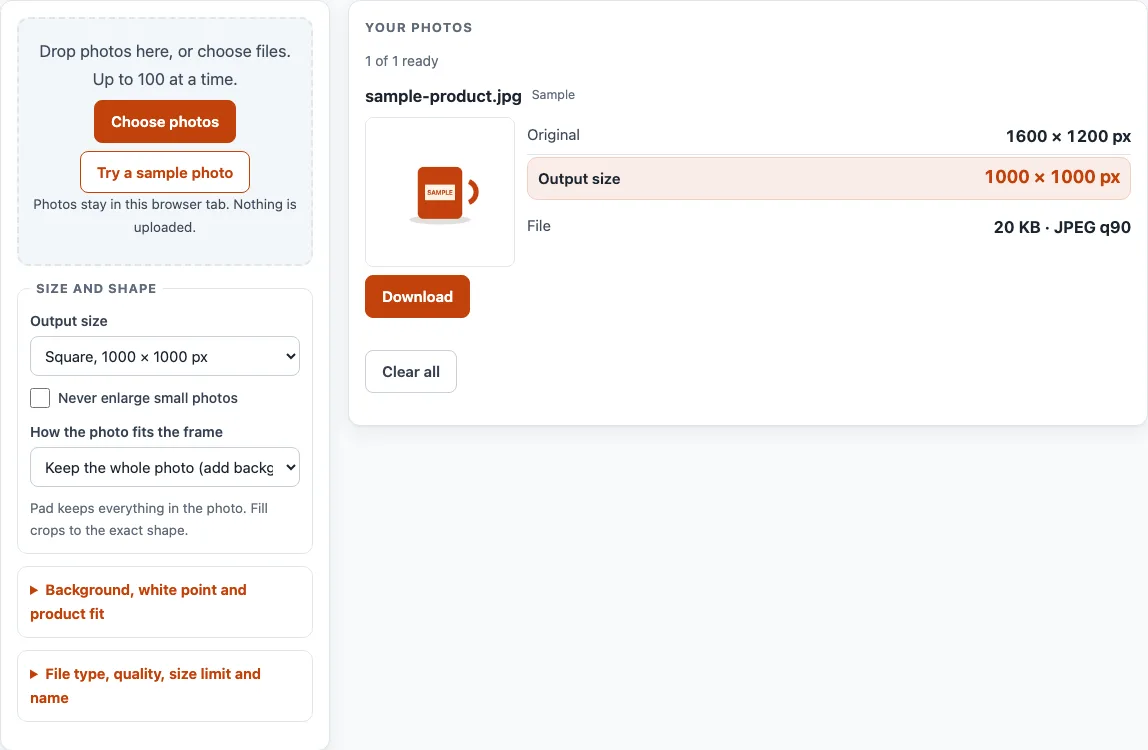
How to use the Poshmark photo size tool
- Click “Choose photos” or drop your files on the box. You can add up to 100 photos per batch. To try the tool first, click “Try a sample photo”.
- Open the “Output size” menu. Choose “Square, 1000 × 1000 px” (our default) or “Portrait 3:4, 1000 × 1333 px”. For any other size, choose “Custom size…” and enter Width (px) and Height (px).
- Tick “Never enlarge small photos” if you do not want small photos stretched to the output size.
- Under “How the photo fits the frame”, choose “Keep the whole photo (add background around it)” or “Fill the frame (cut off the overflow)”.
- If you chose fill, set “Crop focus” to Centre, Top, Bottom, Left or Right.
- To set a limit, enter a value in “Keep each file under” and pick KB or MB. JPEG and WebP quality is lowered until the file fits. PNG cannot be shrunk this way, so the tool does not apply the limit to PNG and tells you so.
- Check each card. It shows “Original” size, “Output size” and “File” size, plus any notes or checks. A batch with more than 16 photos is flagged, which matches Poshmark’s limit of up to 16 photos per listing.
- Click “Download” on a card to save that photo. When two or more photos are ready, “Download ZIP (first 10)” appears; the free ZIP holds the first 10 results.
“Clear all” empties the list.
What is the poshmark photo size on Poshmark’s own pages?
Poshmark’s How to list page says you can add up to 16 photos per listing and that images should be sized to 1000 × 1000 pixels for optimal quality. That is the only pixel size the platform gives for listing photos, and the page does not say the size is required. It gives no pixel size for portrait photos.
Why are there square and portrait sizes?
Poshmark’s blog post of 25 March 2026 says listing photos now appear in portrait format (3:4) across Poshmark. Sellers may update cover photos to portrait but do not have to, and existing square photos are kept. Shoppers can open the listing to see the original. The help page and the March 2026 post do not give the same shape, so this tool offers both. The 1,333 px height in “Portrait 3:4, 1000 × 1333 px” is our own size for the 3:4 shape, not a number from Poshmark.
How does the tool fit a photo into the frame?
The tool compares the photo’s shape with the output frame and uses one of two methods. “Keep the whole photo (add background around it)” scales the photo to fit inside the frame and adds bars where space is left. A 4,000 × 3,000 photo in a 1,000 × 1,000 frame is drawn at 1,000 × 750 px, with 125 px bars above and below. “Fill the frame (cut off the overflow)” scales the photo to cover the frame and trims the excess. “Crop focus” decides which part is kept. A 4,000 × 3,000 photo filling a 1,000 × 1,333 frame, centred, keeps a 2,250 × 2,999 px area starting at x 875, y 1, then scales it to 1,000 × 1,333 px. When a photo must be enlarged to reach the output size, its card shows the percentage. An enlarged photo has no extra detail.
What happens to transparency, rotation and metadata when I save?
Transparent areas are filled with the background colour you choose, so the output never has transparency. The tool does not remove or replace backgrounds and does not edit colours beyond that fill. Photos with an EXIF rotation are drawn the right way up. Saving through the tool writes a new file without the original’s camera, date and location (EXIF) data.
Poshmark: what the help pages say
| Item | What it says | Source |
|---|---|---|
| Photos per listing | Up to 16 | Poshmark Support: How to list |
| Recommended size | Images sized to 1000 × 1000 px for optimal quality | Poshmark Support: How to list |
| Listing photo shape (from March 2026) | Listing photos appear in portrait 3:4 across Poshmark; sellers may update cover photos but do not have to | Poshmark Blog: A New Look for Listing Photos (25 March 2026) |
| Existing square photos | Kept; shoppers can open the listing to see the original | Poshmark Blog: A New Look for Listing Photos (25 March 2026) |
| Pixel size for portrait | Not given | Poshmark Blog: A New Look for Listing Photos (25 March 2026) |
Read on 16 October 2026. Platforms change their rules; the platform's own page decides.
Worked examples
| Input | Result |
|---|---|
| 4,000 × 3,000 photo, 1,000 × 1,000 frame, keep whole photo | photo drawn at 1,000 × 750 px, 125 px bars above and below |
| 3,000 × 4,000 photo, 1,000 × 1,333 frame, keep whole photo | photo drawn at 1,000 × 1,333 px, no bars |
| 4,000 × 3,000 photo, 1,000 × 1,333 frame, fill the frame (center) | keeps a 2,250 × 2,999 px area starting at x 875, y 1; scaled to 1,000 × 1,333 px |
Calculated by the same code the tool above runs.
Frequently asked questions
Is 1000 × 1000 pixels the poshmark photo size Poshmark requires?
Poshmark’s How to list page says images should be sized to 1000 × 1000 pixels for optimal quality (read 16 October 2026). It does not describe that size as a requirement, so check the page for current wording.
Does Poshmark give a pixel size for portrait photos?
No. Poshmark’s March 2026 blog post says listing photos appear in portrait 3:4, but it gives no pixel size for portrait. “Portrait 3:4, 1000 × 1333 px” is our own size.
Will a photo resized here be accepted on Poshmark?
This tool cannot tell you that. It produces files at the sizes you choose. It flags a batch with more than 16 photos, matching the per-listing limit on Poshmark’s help page.
Can I use this as a poshmark photo editor to remove backgrounds?
No. The tool resizes and fits photos. It does not remove or replace backgrounds, and it does not edit colours beyond filling transparent areas.
Are my photos uploaded when I use the tool?
No. Photos are read and processed inside your browser and are never uploaded. There is no sign-up, and the tool is free.
How many photos can I process at once?
You can add up to 100 photos per batch. The free “Download ZIP (first 10)” button saves the first 10 results. A whole-batch ZIP is a planned Pro feature; there is a waitlist at /pro/, and nothing paid exists yet.
Why won’t my iPhone HEIC photo open?
HEIC photos from an iPhone may not open outside Safari. If yours does not, export it as JPEG first.
Related tools
- Add Lot Number to Photos: Print an increasing lot number or SKU on every photo in a batch.
- Batch Resize Photos for Listings: Resize a whole batch to a marketplace’s size, or to a custom size.
- Batch Watermark Photos: Add a text or logo watermark to many photos at once.
- Image to Square: Turn photos into 1:1 squares by padding or cropping.
- Listing Photo Checker: Test photos against the published Etsy, eBay, Amazon and Shopify numbers.
- Make Photo White Background: Flatten transparent images onto white, pad to a square and whiten a greyish backdrop.
- Amazon Product Image Requirements: Resize product photos for Amazon and fit the product to 85% of a white square.
- eBay Picture Size: Resize photos to eBay’s recommended size and check them against eBay’s numbers.
- Marketplace Photo Size Guides: Browse the photo size page for every marketplace.