Vinted Photo Size
Vinted sets no pixel size. Resize the batch and keep the first photo a full view of the item.
The vinted photo size tool resizes listing photos in batches to the sizes you choose. It runs in your browser, is free, and needs no sign-up. Photos are read and processed inside the page and are never uploaded.
Vinted’s help page allows up to 20 photos per listing, but it does not state a pixel size. The two sizes in the tool’s menu are our own choices, not Vinted rules: square 1200 × 1200 px is our default, and “Keep the shape, longest side 1600 px” keeps each photo’s proportions. Use the tool to prepare a full set of photos at once, then look at each result before you upload it.
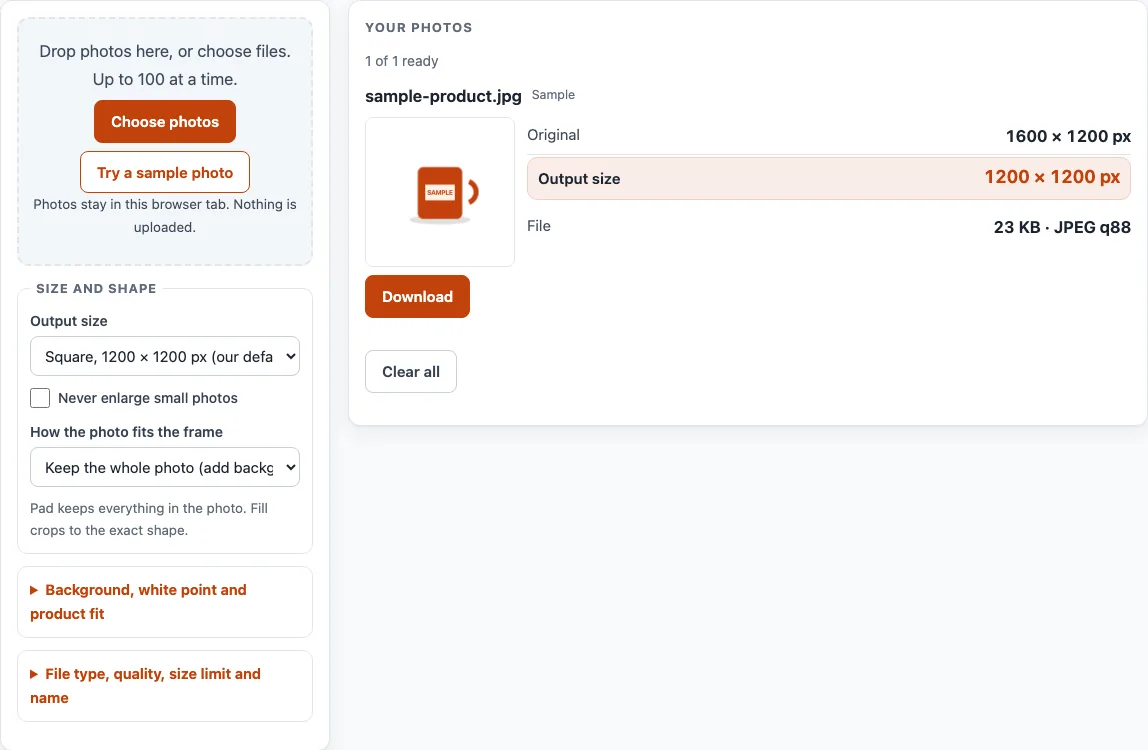
How to use the Vinted photo size tool
- Click “Choose photos” or drop your files onto the box. A batch can hold up to 100 photos. To try the tool first, click “Try a sample photo”.
- Open the “Output size” menu and pick “Square, 1200 × 1200 px (our default)” or “Keep the shape, longest side 1600 px”. For other dimensions, choose “Custom size…” and enter a Width (px) and Height (px).
- Tick “Never enlarge small photos” if you do not want small originals stretched to the output size.
- Under “How the photo fits the frame”, choose “Keep the whole photo (add background around it)” or “Fill the frame (cut off the overflow)”. If you pick the fill option, set “Crop focus” to Centre, Top, Bottom, Left or Right.
- Set “Keep each file under” in KB or MB if you need a file limit. Then choose JPEG, PNG or WebP as the file type. JPEG is the default.
- Check each card. It shows the “Original” size, the “Output size”, the “File” size, and any notes or checks.
- Click “Download” on a single card, or “Download ZIP (first 10)” when two or more photos are ready. The free ZIP holds the first 10 results.
- Click “Clear all” to empty the list before your next batch.
You can also set a file name pattern using the tokens {name}, {n}, {lot} and {w}, {h}. Each change redraws every photo straight away.
What is the Vinted photo size requirement?
Vinted’s help page does not state a pixel size for listing photos. It sets other limits instead: up to 20 photos per listing, and a first photo that shows the entire item with no collages.
The page also asks for your own pictures, natural daylight without flash or filters, and close-ups of labels, logos and defects. None of these is a size, so the tool cannot check them for you.
Which picture size should I choose for Vinted photos?
The tool offers two sizes: square 1200 × 1200 px, which is our default, and a shape-keeping option with a longest side of 1600 px. Neither comes from Vinted, because the help page gives no pixel figure.
Pick the size that suits how you photograph your items, and check the help page again if you need the latest guidance. The page was read on 16 October 2026.
How does the tool fit a photo into a square frame?
With “Keep the whole photo (add background around it)”, the whole picture stays visible. A 4,032 × 3,024 px photo in a 1,200 × 1,200 px frame is drawn at 1,200 × 900 px, with 150 px bars above and below. Transparent areas are filled with the background colour you choose, so the output never has transparency.
With “Fill the frame (cut off the overflow)”, the frame is filled and the extra edges are removed. A 3,024 × 4,032 px portrait with a centre crop keeps a 3,024 × 3,024 px area starting at x 0, y 504, then scales it to 1,200 × 1,200 px. “Crop focus” decides which part of the photo stays.
Why does the card say a photo was enlarged?
When a photo must grow to reach the output size, the card shows by how many percent. An enlarged photo has no extra detail, so it can look softer than the original. “Never enlarge small photos” stops this by leaving small originals at their own size.
Vinted: what the help pages say
| Item | What it says | Source |
|---|---|---|
| Photos per listing | Up to 20 | Vinted Help Center: What photos you should upload |
| Pixel size | Not stated on the help page | Vinted Help Center: What photos you should upload |
| First photo | Show the entire item; do not use collages | Vinted Help Center: What photos you should upload |
| Your own pictures | Do not use stock or watermarked images found online | Vinted Help Center: What photos you should upload |
| Light | Natural daylight preferred; avoid flash and filters | Vinted Help Center: What photos you should upload |
| Close-ups | Add close-ups of labels, logos and defects | Vinted Help Center: What photos you should upload |
Read on 16 October 2026. Platforms change their rules; the platform's own page decides. Where a row says the platform does not state a size, the pixel size offered in the tool is our own default, not a rule.
Worked examples
| Input | Result |
|---|---|
| 4,032 × 3,024 photo, 1,200 × 1,200 frame, keep whole photo | photo drawn at 1,200 × 900 px, 150 px bars above and below |
| 4,032 × 3,024 photo, longest side 1,600 px | 1,600 × 1,200 px |
| 3,024 × 4,032 photo, 1,200 × 1,200 frame, fill the frame (center) | keeps a 3,024 × 3,024 px area starting at x 0, y 504; scaled to 1,200 × 1,200 px |
Calculated by the same code the tool above runs.
Frequently asked questions
Is there a Vinted photo size limit?
Vinted’s help page states up to 20 photos per listing. It does not state a pixel size for photos.
Where do the 1200 × 1200 px and 1600 px sizes come from?
They are our own output sizes. The 1200 × 1200 px square is our default, and the 1600 px longest side is an option you can select. Neither is a Vinted rule.
Are my photos uploaded when I use this tool?
No. Photos are read and processed inside your browser and are never uploaded. The tool is free and needs no sign-up.
Does the tool remove or replace backgrounds?
No. It adds background around a photo when you choose “Keep the whole photo”, but it does not remove or replace the background in your picture.
Does saving through the tool keep my camera and location data?
No. Saving a photo through the tool writes a new file without the original’s camera, date and location (EXIF) data.
How many photos can a Vinted listing have?
Vinted’s help page says up to 20 per listing, and that the first photo should show the entire item without a collage.
Does the tool combine photos into a collage?
No. It processes each photo on its own. Vinted’s help page says not to use collages for the first photo.
Related tools
- Add Lot Number to Photos: Print an increasing lot number or SKU on every photo in a batch.
- Batch Resize Photos for Listings: Resize a whole batch to a marketplace’s size, or to a custom size.
- Batch Watermark Photos: Add a text or logo watermark to many photos at once.
- Image to Square: Turn photos into 1:1 squares by padding or cropping.
- Listing Photo Checker: Test photos against the published Etsy, eBay, Amazon and Shopify numbers.
- Make Photo White Background: Flatten transparent images onto white, pad to a square and whiten a greyish backdrop.
- Amazon Product Image Requirements: Resize product photos for Amazon and fit the product to 85% of a white square.
- eBay Picture Size: Resize photos to eBay’s recommended size and check them against eBay’s numbers.
- Marketplace Photo Size Guides: Browse the photo size page for every marketplace.